
Unofficial Player Wiki
Chop Chop Inc. gameplay
The confirmed Chop Chop Inc. gameplay loop is a production line with a first-person feel: cut trees, process the material, craft furniture, sell the result, and reinvest into faster work. Official descriptions also connect progression to new areas and tree types, tools, machines, strength, stamina, and automation. This page explains that sequence from the evidence available for the current release, then lets the official Steam screenshots carry the visual details that text cannot replace.
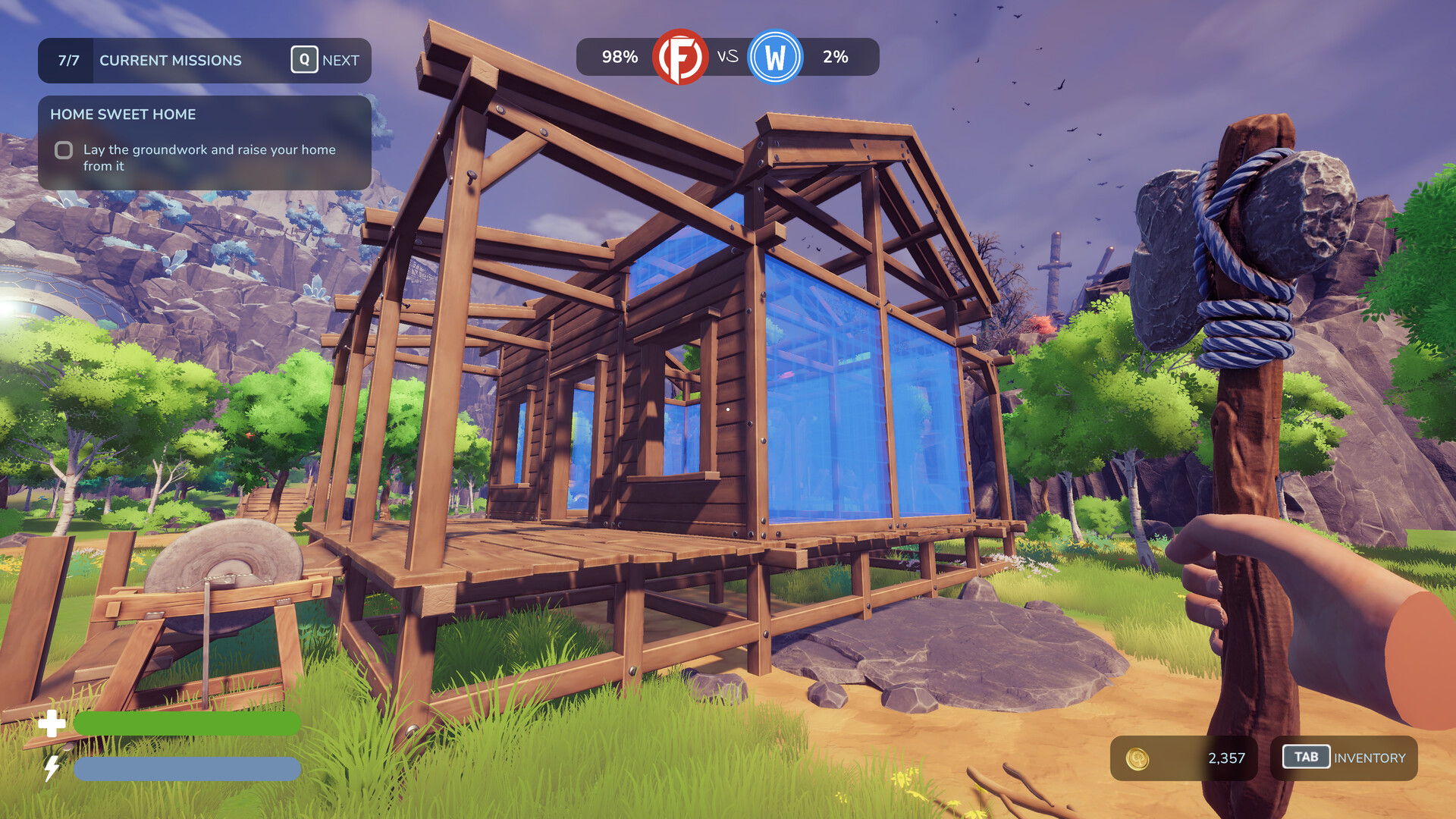
First-person view of a wooden house frame in a bright forest while holding an axe.
Entry 13 is the official Steam reveal trailer, loaded only after selection.
Steam sourceCut: start with the material in front of you
Chop Chop Inc. opens its production loop in the world rather than in a detached catalogue. The player cuts trees, carries the resulting material, and decides what the workshop can do with it next. The axe-in-hand perspective makes the first step tactile: timber is gathered through movement and work, not selected from a menu as an abstract number. The official product description calls out unusual stone, metal, and electric trees, so the source material is part of the game's personality as well as its economy.
The current sources do not publish a complete list of tree types, resource yields, or tool statistics. That limit is useful when reading the gallery: a screenshot can show an environment, a tool, or a work area, but it does not turn a visible object into a canonical item record. The fieldbook therefore describes the confirmed action and keeps unlisted quantities out of the interface.
Process: logs become workable parts
Raw logs are processed into planks and other components before they can serve a finished piece. This is the hinge between exploration and furniture production. It explains why a workbench or production hall matters: the workshop is not just a backdrop, but the place where the material changes state and becomes useful for a crafted object. The full loop can be read as a chain of transformations—tree, log, processed part, furniture, sale—rather than a collection of unrelated activities.
The official screenshot set includes a sawhorse crafting menu with wooden beam and plank recipes. It gives the process step a real interface reference without requiring us to infer every recipe in the game. The page shows that image as one of twelve direct gallery entries, while this explanation stays at the evidence-backed system level. No current source supplies a complete recipe graph, processing duration table, or price formula, so none is presented here.
Craft: build the furniture that gives the loop a purpose
Crafting is where processed timber becomes the visible output of the business. The official material shows outdoor workbenches, a production hall, machines, and furniture being positioned in the world. Those scenes support a practical reading: the player is making and arranging objects while building a more capable operation, not only filling a conventional inventory. The workbench images give the loop a physical scale, from a single small chair to a room shaped around production.
The game also connects crafting to quirky characters and areas that become part of the production chain. That language supports an expanding workshop with surprises in its world, but it does not establish a named roster or a character-detail route. This page keeps the character reference inside the gameplay explanation and uses the official gallery for visual context instead of manufacturing unsupported character pages. The useful takeaway is the relationship between a station, a material state, and the furniture placed into the growing operation.
Sell: turn finished pieces into momentum
Furniture has a role after it leaves the workbench: the official loop sends finished pieces into sale and distribution. That step turns crafting into a business decision. A player can read the workshop as a sequence of choices about what to gather, what to process, which production capacity to improve, and how to keep the next project moving. The page does not claim fixed prices or a profit ranking because those fields were not published in the current first-party dataset.
This distinction keeps the interaction useful. The gallery can show the visual language of a production hall and the variety of spaces, while the prose explains the confirmed relation between making and selling. A future official source could add prices or a current recipe list without forcing the existing route to pretend those numbers were already known. Until then, the sale step is best understood as the momentum that sends material back to the next investment rather than as a measured spreadsheet result.
Expand: reinvest in a faster line
Reinvestment closes the loop. Official descriptions name tools, machines, new areas, new tree types, strength and stamina upgrades, and automated production lines. These are not separate upgrade categories in this page's navigation; they are the pressure that makes the five-stage chain repeat with a larger reach. Manual work can grow into production lines that handle higher-value furniture sets, giving the workshop a sense of scale without turning the page into a generic management dashboard.
Hotfix #3 is the current release anchor for this explanation. The gallery remains tied to the full Steam App ID, and the trailer facade uses the exact official Steam HLS source from the media manifest. Select an image to compare the workbench, crafting menu, production hall, environments, and tools directly; the selected caption remains tied to that manifest record. This keeps expansion grounded in the captured loop while leaving future numeric upgrade details to a source that actually publishes them.